
Vue3应用运行逻辑
作者:Alpha时间:2025-12-03 阅读数:119 +人阅读
一个基础应用目录结构如下:
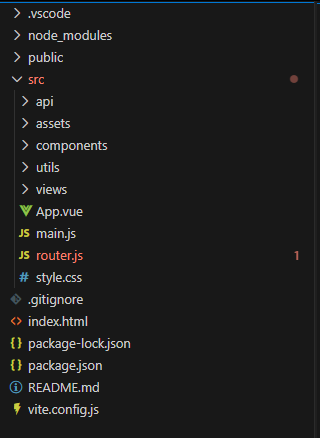
单应用模式,入口文件为:index.html
index.html代码:
<!doctype html>
<html>
  <head>
    <meta charset="UTF-8" />
    <link rel="icon" type="image/svg+xml" href="/vite.svg" />
    <meta name="viewport" content="width=device-width, initial-scale=1.0" />
    <title>VUE3学习文档</title>
  </head>
  <body>
    <div id="app"></div>
    <script type="module" src="/src/main.js"></script>
  </body>
</html>
打开应用进入默认index.htmL页面,代码中引入了main.js文件,所有内容会被加载到【id='app'】这个div中,剩下的配置数据在main.js中进行。
main.js代码如下:
import { createApp } from 'vue'
import App from './App.vue'

import './style.css'
import './assets/shCoreDefault.css'

import router from './router'
import axios from 'axios'
import VueAxios from 'vue-axios'

createApp(App).use(router).use(VueAxios, axios).mount('#app')
每个Vue应用都是通过createApp函数创建一个新的应用实例,上面的代码也可以改成下面的写法,更加清晰明了
import { createApp } from 'vue'
import App from './App.vue'
import './style.css'
import './assets/shCoreDefault.css'
import router from './router'
import axios from 'axios'
import VueAxios from 'vue-axios'
const app = createApp(App);
//需要用的的组件,统统在这里进行配置引入
app.use(router)
app.use(VueAxios, axios)
//挂载应用 这里的#app 即为<div id='#app'></div>
app.mount('#app')
.mount()方法应该始终在整个应用配置和资源注册完成后被调用。同时请注意,不同于其他资源注册方法,它的返回值是根组件实例而非应用实例。
本站部分内容或图片来自互联网,如果侵犯了你的权益请来信告知我们删除。邮箱:595397166@qq.com
上一篇:没有了
下一篇:模板语法